

If you run a Shopify store, you may have noticed something confusing. Shopify Analytics shows one number. GA4 shows another.
Shopify may report 300 orders, while GA4 shows 270 purchases. Shopify may show a higher conversion rate, while GA4 may show fewer sessions. Revenue, traffic sources, and even campaign performance may also look different across both platforms.
For ecommerce teams, this can create doubt. Which platform is right? Which report should be trusted? Is there a tracking issue, or is this normal?
The answer is simple: Shopify Analytics and GA4 are not built to measure the same thing in the same way.
Shopify is closer to your store’s actual order and sales data. GA4 is built to understand user behavior, traffic sources, and customer journeys. Both tools are useful, but they answer different questions.
The goal is not to make Shopify and GA4 match perfectly. The goal is to understand why the numbers differ and how to use both tools correctly.
The Core Difference Between Shopify Analytics and GA4
Shopify Analytics is mainly a store performance tool. It helps you understand what happened inside your Shopify store. This includes orders, sales, products sold, customers, discounts, refunds, checkout activity, and conversion performance.
GA4 is mainly a behavior and marketing analytics tool. It helps you understand how users reached your website, which pages they viewed, what actions they took, and which channels influenced conversions.
A simple way to understand the difference is this:
|
That difference matters because store data and tracking data are collected differently.
A Quick Comparison On Shopify Analytics vs GA
Shopify Analytics and GA4 serve different reporting needs. The table below compares their key features, data capabilities, reporting depth, and ideal use cases to help you understand which platform is better suited to each aspect of ecommerce analysis.
| Area | Shopify Analytics | GA4 |
|---|---|---|
| Main role | Store and sales reporting | User behavior and marketing analysis |
| Best for | Orders, revenue, products, customers, refunds | Sessions, users, traffic sources, events, campaigns |
| Data source | Shopify store backend | Tags, events, cookies, browsers, and consent settings |
| Purchase tracking | Records orders directly in Shopify | Records purchase events when tracking fires |
| Revenue reporting | Closely connected to store transactions | Depends on ecommerce tracking setup |
| Attribution | Focuses more on the store and sales channels | Focuses more on the user journey and campaign paths |
| Privacy impact | Less affected for confirmed orders | More affected by cookies, consent, and ad blockers |
| Best source for | Sales and operational reporting | Marketing and journey analysis |
Both platforms are useful. The mistake is expecting them to produce identical numbers.
Why Shopify and GA4 Numbers Differ
Shopify and GA4 are built for different reporting purposes, so their numbers rarely match exactly. Several tracking, attribution, and data-processing factors can create these differences, as explained below.
1. Shopify Records Orders, GA4 Records Events
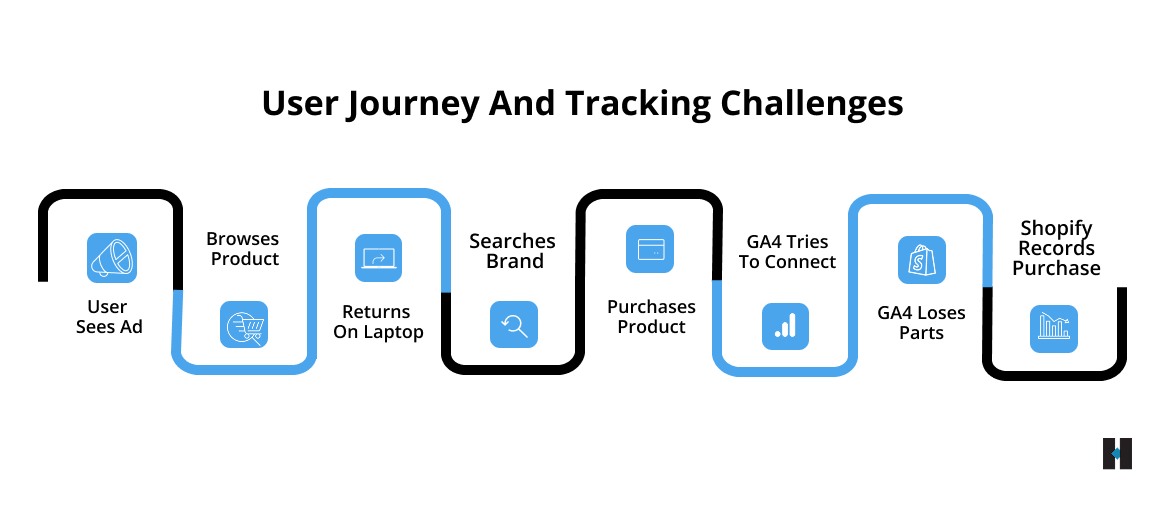
This is the biggest difference. When a customer places an order, Shopify records it directly in the store backend. That order becomes part of Shopify’s sales data.
GA4 does not automatically know that an order happened. It only records a purchase when the purchase event fires correctly.
GA4 may miss a purchase if:
- The purchase event is not set up correctly
- The thank you page does not load fully
- The customer closes the browser too soon
- A browser blocks tracking
- The user rejects analytics cookies
- Google Tag Manager is not configured properly
- The transaction ID is missing
This is why Shopify often shows more orders than GA4 shows purchases. For the actual order count, Shopify is usually the stronger source of truth.
2. Revenue Is Calculated Differently
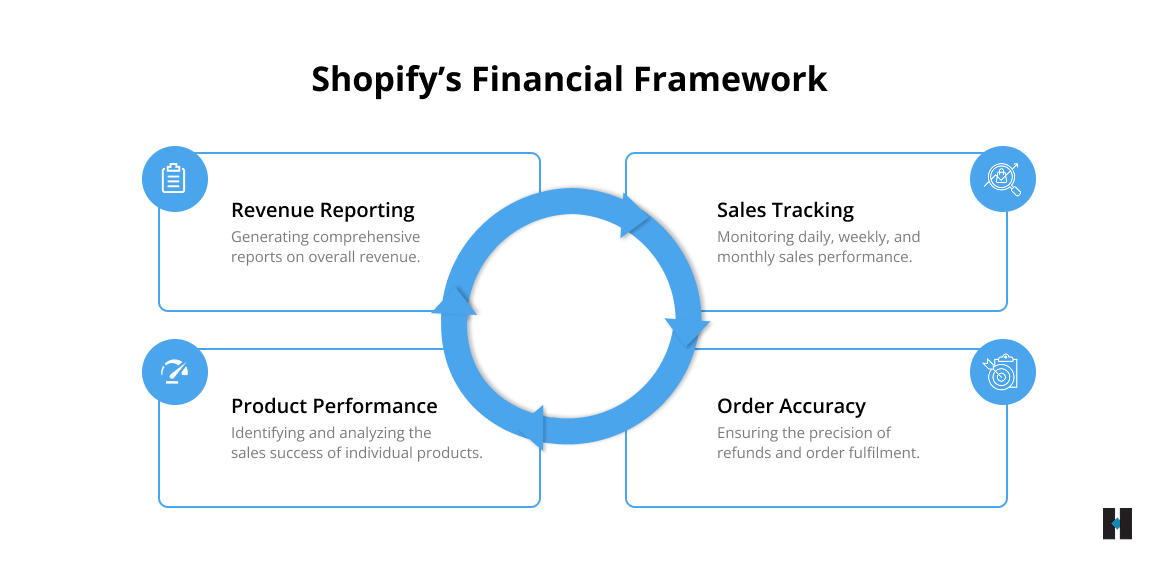
Revenue differences are also common. Shopify revenue is tied to your store’s actual transactions. Depending on the report, Shopify may show gross sales, net sales, discounts, taxes, shipping, refunds, or total sales.
GA4 revenue depends on how ecommerce tracking is configured. If the purchase event sends the wrong value, misses shipping, excludes tax, duplicates a transaction, or does not pass product details correctly, GA4 revenue will differ from Shopify.
For example, Shopify may include shipping in one report, whereas GA4 may capture only product revenue. Shopify may adjust for refunds, while GA4 may still show the original purchase value.
Before comparing revenue, define what revenue means for your report. Are you looking at gross sales, net sales, total sales, revenue before tax, revenue after discounts, or revenue excluding shipping? If the definition differs, the number will differ.
3. Sessions Are Not Counted the Same Way
A session sounds simple, but every platform has its own method for counting it. GA4 creates sessions based on user activity, session IDs, engagement signals, and time-based rules. Shopify has its own way of reporting online store sessions.
Session differences can happen because of:
- Time zone settings
- Returning visitors
- Cookie limitations
- Browser privacy settings
- Consent banners
- Bot filtering
- Multiple tabs
- Cross-device behavior
This means Shopify may show one session count while GA4 shows another. That is normal. When reviewing sessions, choose one platform and use it consistently.
4. Conversion Rate Changes When the Base Data Changes
Conversion rate depends on two numbers: sessions and conversions. If Shopify and GA4 count sessions differently and purchases differently, their conversion rates will also differ.
For example, Shopify may show 100 orders from 5,000 sessions. GA4 may show 90 purchases from 4,700 sessions. Both platforms will calculate different conversion rates because their inputs differ.
For store-level reporting, the Shopify conversion rate is often easier to connect with business performance. For marketing analysis, GA4 conversion rate can be more useful because it helps compare channels, campaigns, devices, and landing pages.
5. Attribution Works Differently
Attribution means deciding which traffic source or campaign gets credit for a sale. This is one of the most common reasons Shopify and GA4 do not match. A customer may discover your store on Instagram, return via Google, click a link in an email later, and finally purchase during a direct visit.
Which channel should get credit?
Shopify and GA4 may answer that differently. Shopify may assign credit based on its own sales channel or referral logic. GA4 uses its own event-based model, campaign data, session data, and attribution rules.
This is why Shopify may say a sale came from email, while GA4 may show paid search, organic search, or direct traffic.
Neither platform is always fully wrong. They are simply looking at the journey differently.
6. Direct Traffic Can Be Overreported
Direct traffic does not always mean someone typed your website URL directly.
In GA4, direct traffic often appears when the platform cannot identify the original source.
This may happen when:
- UTM tags are missing
- Email links are not tagged
- Social media apps hide referral data
- Redirects remove campaign parameters
- Payment gateways interrupt the journey
- Browser privacy settings limit source data
As a result, GA4 may place traffic under direct even when the user originally came from email, paid ads, organic social, or referral campaigns. This can make direct traffic look stronger than it really is. A clean UTM structure helps reduce this problem.
7. Privacy Settings Affect GA4 More
GA4 depends on tracking signals such as cookies, tags, browser data, and user consent. If a user blocks cookies, rejects analytics consent, uses an ad blocker, or browses with strict privacy settings enabled, GA4 may not capture the full journey.
Shopify can still record the final order because it occurs within the store’s backend. This is another reason GA4 purchases may be lower than Shopify orders. GA4 is valuable, but it should not be treated as an accounting tool. It is a behavior and marketing analytics tool.
8. Time Zones Can Shift Daily Reports
Sometimes the numbers differ because both platforms are using different time zones. An order placed late at night may appear on one date in Shopify and another date in GA4.
This can create confusion in daily or weekly reports, especially for stores selling across different regions. Before assuming a tracking issue, check whether Shopify and GA4 are using the same time zone.
9. Refunds and Order Edits May Not Match
Shopify is directly connected to refunds, cancellations, order edits, discounts, and post-purchase changes. GA4 may not always reflect these changes unless refund or adjustment tracking is implemented properly.
For example, if a customer places an order and later receives a partial refund, Shopify can show the adjusted sales value. GA4 may still show the original purchase value. This is why Shopify is usually better for financial reporting.
Which Platform Should You Trust?
Instead of asking which platform is correct, ask which platform is right for the decision. Use Shopify Analytics when you need to understand:
- Actual orders
- Store revenue
- Product sales
- Refunds
- Discounts
- Average order value
- Customer purchase history
- Operational sales performance
Use GA4 when you need to understand:
- Traffic sources
- Campaign performance
- Landing page behavior
- User journeys
- Funnel movement
- Add to cart behavior
- Checkout behavior
- Channel quality
Shopify is stronger for sales truth.
GA4 is stronger for journey truth.
A mature ecommerce reporting system uses both.
How Ecommerce Teams Should Handle Shopify and GA4 Data Differences?
Ecommerce teams should not expect Shopify and GA4 data to match perfectly. Instead, they should focus on maintaining accurate tracking, understanding what each platform measures, and using the right data source for each business decision. The following steps can help teams reduce discrepancies and improve reporting reliability.
1. Define a Source of Truth for Each Metric
Do not let every report turn into a Shopify vs. GA4 debate.
Create a clear internal rule.
| Metric | Recommended Source |
|---|---|
| Orders | Shopify |
| Revenue | Shopify |
| Refunds | Shopify |
| Product sales | Shopify |
| Sessions | Choose one platform and use it consistently |
| Traffic source performance | GA4 |
| Landing page performance | GA4 |
| User journey analysis | GA4 |
| Campaign behavior | GA4 |
| Final financial reporting | Shopify |
This makes reporting cleaner and reduces confusion.
2. Audit GA4 Ecommerce Tracking
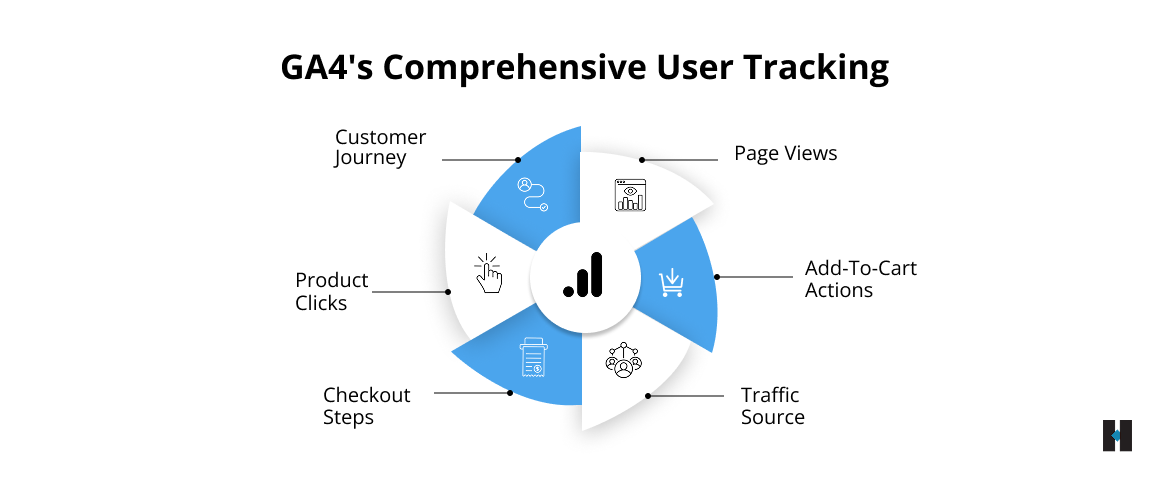
Your GA4 setup should be reviewed regularly.
Important ecommerce events include:
- Product view
- Add to cart
- Begin checkout
- Add payment information
- Purchase
The purchase event should include transaction ID, value, currency, product name, product ID, quantity, and item price. If these details are missing or incorrect, GA4 ecommerce reports may become unreliable.
3. Standardize UTM Tags
UTM tags help GA4 understand where traffic came from. Avoid using multiple names for the same source. For example, do not use Facebook, Facebook, fb, Meta, and meta ads for the same platform. Choose one format and use it consistently.
A clean structure may look like this:
- utm_source=meta
- utm_medium=paid_social
- utm_campaign=summer_sale
- utm_content=carousel_ad
This makes campaign reporting much clearer.
4. Align Time Zones
Make sure Shopify and GA4 use the same reporting time zone. This small setting can prevent major confusion in daily and weekly reports.
5. Review Referral Issues
Payment gateways and third-party checkout tools can sometimes appear as referral sources in GA4. This can break the original customer journey and assign sales to the wrong source. Review referral reports and exclude unwanted referrals where required.
6. Compare Trends, Not Perfect Matches
A small difference between Shopify and GA4 is normal. Instead of expecting exact matches, compare trends.
Ask:
- Are both platforms showing growth?
- Are both showing a decline?
- Did the difference suddenly increase?
- Is only one channel affected?
- Did the issue start after a theme, app, checkout, or tag change?
A stable difference may be acceptable. A sudden large gap should be investigated.
How to Read Both Platforms Together?
If Shopify revenue is growing and GA4 shows better traffic quality, your growth is likely healthy. If Shopify revenue is flat but GA4 traffic is increasing, the issue may be conversion quality, pricing, offer clarity, product pages, or checkout friction.
If Shopify orders are stable but GA4 purchases suddenly drop, tracking may be broken. If GA4 shows strong traffic from a campaign but Shopify sales do not improve, the campaign may be attracting low-intent users.
If Shopify shows strong sales but GA4 gives most credit to direct traffic, your campaign tracking may need cleanup. The value is not in choosing one platform over the other. The value is in knowing what each platform is telling you.
How tecHindustan Can Help You Fix Analytics Gaps?
For ecommerce brands, analytics is not just a reporting task. It affects marketing decisions, campaign budgets, SEO planning, conversion optimization, and revenue clarity.
We at, tecHindustan help businesses build reliable digital systems across ecommerce development, Shopify solutions, analytics implementation, website optimization, app development, and custom technology support.
For Shopify stores, this can include:
- GA4 ecommerce tracking setup
- Shopify analytics review
- Google Tag Manager implementation
- Conversion tracking audits
- Purchase event validation
- UTM structure planning
- Checkout tracking review
- Dashboard planning
- Website performance improvement
When your analytics setup is clean, your team can stop guessing and start making decisions with more confidence.
If your Shopify and GA4 numbers don’t match, or if your team is unsure which reports to trust,contact tecHindustan to review your tracking setup and build a clearer analytics foundation for your ecommerce business.
Final Thoughts
Shopify Analytics and GA4 are not meant to show identical numbers. Shopify is closer to your actual store transactions. GA4 is closer to your customer journey and marketing behavior.
Shopify helps you understand what sells. GA4 helps you understand how users reached that sale. When numbers differ, do not panic. Check the tracking setup, revenue definitions, attribution rules, consent settings, UTM tags, referral exclusions, and time zones.
Once every metric has a clear role, reporting becomes easier. Your team knows where to look, what to trust, and how to act. Good analytics is not about perfect numbers. It is about better decisions.
FAQs
