

Shopify SEO in 2026 is not just about adding keywords to product titles or installing an SEO app. Those things may help, but they are only a small part of the bigger picture. Today, Google needs to understand your store technically, your product information must be clear, your pages need to load fast, and your content should genuinely help shoppers make better buying decisions.
The ecommerce space is also becoming more competitive. Global ecommerce sales are expected to reach $6.88 trillion in 2026, accounting for 21.1% of total retail sales. That means more brands are selling online, more Shopify stores are competing for the same search positions, and organic visibility is becoming harder to earn.
Search behavior is also changing. Adobe reported that traffic from AI sources to U.S. retail sites grew 393% year over year in the first quarter of 2026, after rising 693% during the 2025 holiday season. This shows that shoppers are no longer relying only on traditional search results; they are also discovering products through AI tools, comparison journeys, and more conversational searches.
At the same time, conversion still matters. Baymard’s ecommerce checkout research shows the average cart abandonment rate is around 70.19%, which means SEO cannot stop at traffic. A Shopify store also needs product clarity, trust, speed, mobile usability, and a smooth purchase journey.
That is why Shopify SEO in 2026 should be treated as a complete growth system. Your technical setup, collection pages, product pages, blog content, structured data, Merchant Center feed, internal links, and user experience all need to work together.
Below is a practical Shopify SEO checklist with 20 things you must optimize to rank better.
1. Set Up Google Search Console and GA4 Correctly
Before you start optimizing your Shopify store, make sure you can measure what is happening.
Google Search Console helps you understand how your store appears in organic search. It shows which queries bring impressions, which pages get clicks, which URLs are indexed, and where Google is facing crawl or indexing problems.
GA4 helps you understand what users do after they land on your site. For Shopify, this is important because SEO should not only bring visitors. It should bring visitors who view products, add items to the cart, start checkout, and buy.
Track these key areas:
- Organic clicks and impressions
- Top-performing landing pages
- Product page visits
- Add-to-cart events
- Checkout starts
- Purchases from organic traffic
- Pages with indexing problems
- Queries with deep impressions but low CTR
A blog post may bring traffic, but a collection page may bring revenue. You need both Search Console and analytics data to know what is actually helping the business.
2. Submit Your Shopify Sitemap
Shopify automatically creates a sitemap for your store. In most cases, it is available at:
yourstore.com/sitemap.xml
Your sitemap usually includes products, collections, pages, and blog posts. Submitting it to Google Search Console helps Google discover important URLs faster.
However, a sitemap does not guarantee rankings. It only helps Google find pages. Those pages still need to be useful, crawlable, indexable, and internally linked.
Review your sitemap regularly and check whether it includes:
- Important product pages
- Main collection pages
- Blog posts worth indexing
- Static pages such as About, Contact, Shipping, and Returns
Also, check whether old products, duplicate URLs, empty collections, or low-value pages are being exposed unnecessarily.
3. Build a Keyword Map Based on Search Intent
One common Shopify SEO mistake is using the same keyword across multiple pages. This creates confusion for Google and can cause keyword cannibalization.
A proper keyword map gives each page a clear purpose.
For example:
- Homepage: broad brand and category terms
- Collection page: “women’s linen shirts.”
- Product page: “white oversized linen shirt”
- Blog post: “how to Style Linen Shirts in summer”
- Comparison page: “linen vs cotton shirts.”
Google recommends using words that people would naturally use to find your content and placing them in important areas such as titles, headings, link text, and alt text.
Do not choose keywords only because they have high search volume. Match keywords with the right intent. A user searching “best LED face mask for home use” needs education. A user searching “buy red light LED face mask” is closer to purchasing. Both are valuable, but they need different pages.
4. Make Your Store Navigation Crawlable
Google understands ecommerce websites through links. If your products or collections are hidden behind search boxes, filters, or JavaScript-only elements, Google may not discover them properly.
Your Shopify navigation should be simple, logical, and crawlable.
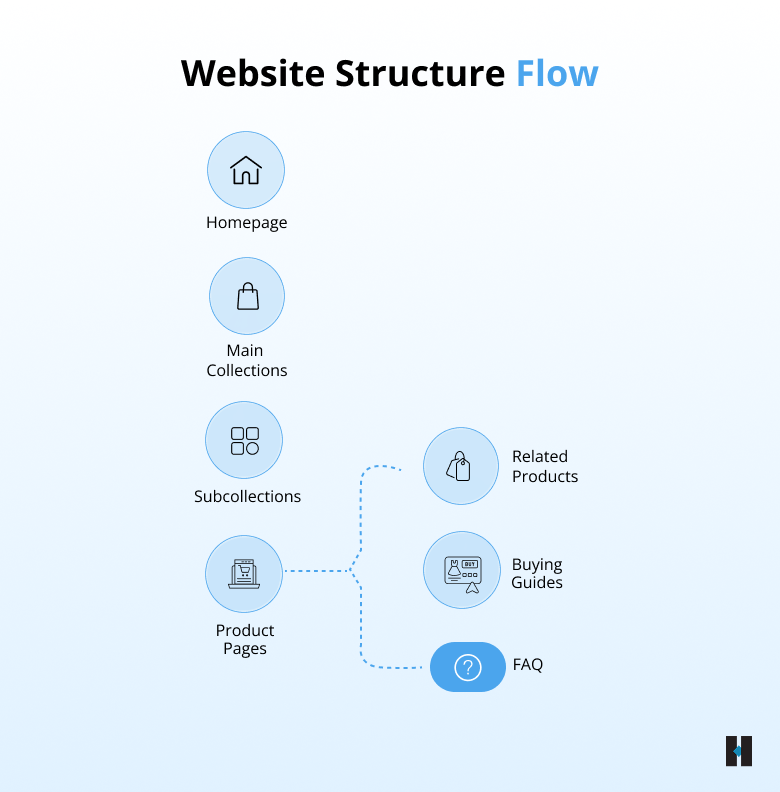
Google’s ecommerce guidance recommends making pages reachable through links, such as menus linking to categories, category pages linking to subcategories, and subcategories linking to product pages.
For Shopify stores, this means your main menu should link to your most important collections. Your collection pages should link to products. Your product pages should link back to relevant collections, buying guides, and related items.
Avoid relying only on internal search. Google generally does not use your site search box the way a human shopper does.
5. Optimize Collection Pages Like Landing Pages
Many Shopify stores focus heavily on product pages but ignore collection pages. That is a mistake.
Collection pages often rank for high-intent category searches, such as:
- “LED face masks.”
- “men’s leather wallets”
- “organic baby clothes”
- “ergonomic office chairs”
- “IPL hair removal devices”
A strong collection page should include:
- A clear H1
- Short intro copy
- Optimized title tag
- Useful meta description
- Crawlable product listings
- Related collection links
- Helpful filters
- Short buying guidance
- FAQs where useful
Do not add a long block of generic SEO text that no shopper wants to read. Your collection content should help users choose faster. Explain what the collection includes, who it is for, what to compare, and how to pick the right product.
For example, a skincare collection page can explain skin concerns, device types, treatment areas, usage frequency, and safety considerations. This helps both users and search engines understand the page better.
6. Write Unique Product Descriptions
Supplier descriptions are one of the biggest reasons Shopify product pages look thin or duplicated. If ten other stores are using the same product description, your page gives Google very little reason to rank it above others.
Google’s helpful content guidance focuses on original, useful, people-first content that provides real value instead of simply repeating what already exists elsewhere.
A good Shopify product description should answer:
- What is the product?
- Who is it for?
- What problem does it solve?
- What is included?
- What size, color, material, or variant options are available?
- How should the customer use it?
- What makes it different?
- What are the delivery, return, or warranty details?
Write for the person who is about to buy. SEO improves when the page becomes more useful, specific, and complete.
7. Write Clear Title Tags
Your title tag is often the first thing a user sees in search results. It should be clear, specific, and written for clicks, not just rankings.
Google advises using descriptive and concise title text that helps users understand what the page is about.
Good Shopify title tag formats include:
- Product Name | Key Feature | Brand
- Collection Keyword | Shop Online | Brand
- Blog Topic | Practical Guide | Brand
Examples:
- Mini IPL Hair Removal Device | At-Home Hair Reduction | Brand
- LED Face Masks | At-Home Skincare Devices | Brand
- How to Choose the Right Office Chair | Ergonomic Buying Guide
Avoid keyword stuffing. A title like “Buy LED Mask Online Best LED Mask Cheap LED Mask” looks untrustworthy and may reduce clicks.
8. Write Meta Descriptions That Encourage Clicks
Meta descriptions do not directly guarantee rankings, but they can influence click-through rate. A strong meta description tells the user why the page is worth visiting.
For Shopify product pages, include:
- Product type
- Main benefit
- Use case
- Important feature
- Delivery or return message, if relevant
- Brand value
Example:
“Shop the Mini IPL Hair Removal Device for easy at-home hair reduction. Designed for smooth routines, simple use, and convenient beauty care from home.”
For collection pages, explain the category clearly. For blog posts, summarize the answer or benefit. Avoid writing a list of keywords. A meta description should read like a helpful invitation, not a search engine trick.
9. Keep Shopify URLs Clean and Consistent
Shopify URLs are usually clean by default, but issues can appear when stores use filters, tags, sorting options, tracking parameters, or app-generated URLs.
Google recommends creating URLs that are simple, logical, and easy for users to understand.
Good Shopify URLs look like:
- /products/black-leather-wallet
- /collections/led-face-masks
- /blogs/guides/how-to-use-ipl-at-home
Avoid messy URLs where possible:
- /products/item123?variant=987&utm_source=random
- /collections/all/tagged/price-low-size-xs-sale
Also, review canonical tags. Shopify can sometimes create multiple paths to the same product, especially when products are accessed through collections. Make sure the canonical version points to the main URL you want Google to index.
10. Use Headings to Improve Page Structure
Headings help users scan your page and help Google understand the structure of your content.
Each important Shopify page should have one clear H1. Usually, this is the product name, collection name, or blog title.
Then use H2s and H3s to organize the page.
For product pages, useful headings include:
- Key Benefits
- How to Use
- What’s Included
- Product Details
- Size and Specifications
- Shipping and Returns
- Customer Reviews
- FAQs
For collection pages, useful headings include:
- Shop by Product Type
- How to Choose
- Best For
- Related Collections
- Frequently Asked Questions
Do not use headings only for design. Use them to create a clear flow that helps shoppers move through the page naturally.
11. Optimize Product Images
Images are critical for Shopify SEO because ecommerce is visual. Product images affect Google Images visibility, page speed, user trust, and conversion.
Google’s product structured data guidance also shows that product information can appear in richer ways across Search, Google Images, and Google Lens when product data is implemented properly.
For images, optimize:
- File names
- Alt text
- File size
- Image dimensions
- Product angles
- Lifestyle images
- Mobile display
- WebP format, where possible
Instead of uploading:
IMG_0098.jpg
Use:
black-leather-crossbody-bag-gold-chain.jpg
Alt text should describe the image naturally, such as:
“Black leather crossbody bag with gold chain strap”
Do not stuff alt text with repeated keywords. It should help describe the image clearly.
12. Add Product Structured Data
Product structured data helps Google understand key product details such as price, availability, ratings, reviews, shipping, and returns.
Google explains that Product structured data can make product information eligible to appear in richer formats across Google Search results.
For Shopify, check whether your theme or SEO app already outputs Product schema. Then test your pages using Google’s Rich Results Test.
Make sure your structured data matches the visible page. Do not add fake reviews, wrong prices, incorrect stock status, or hidden information.
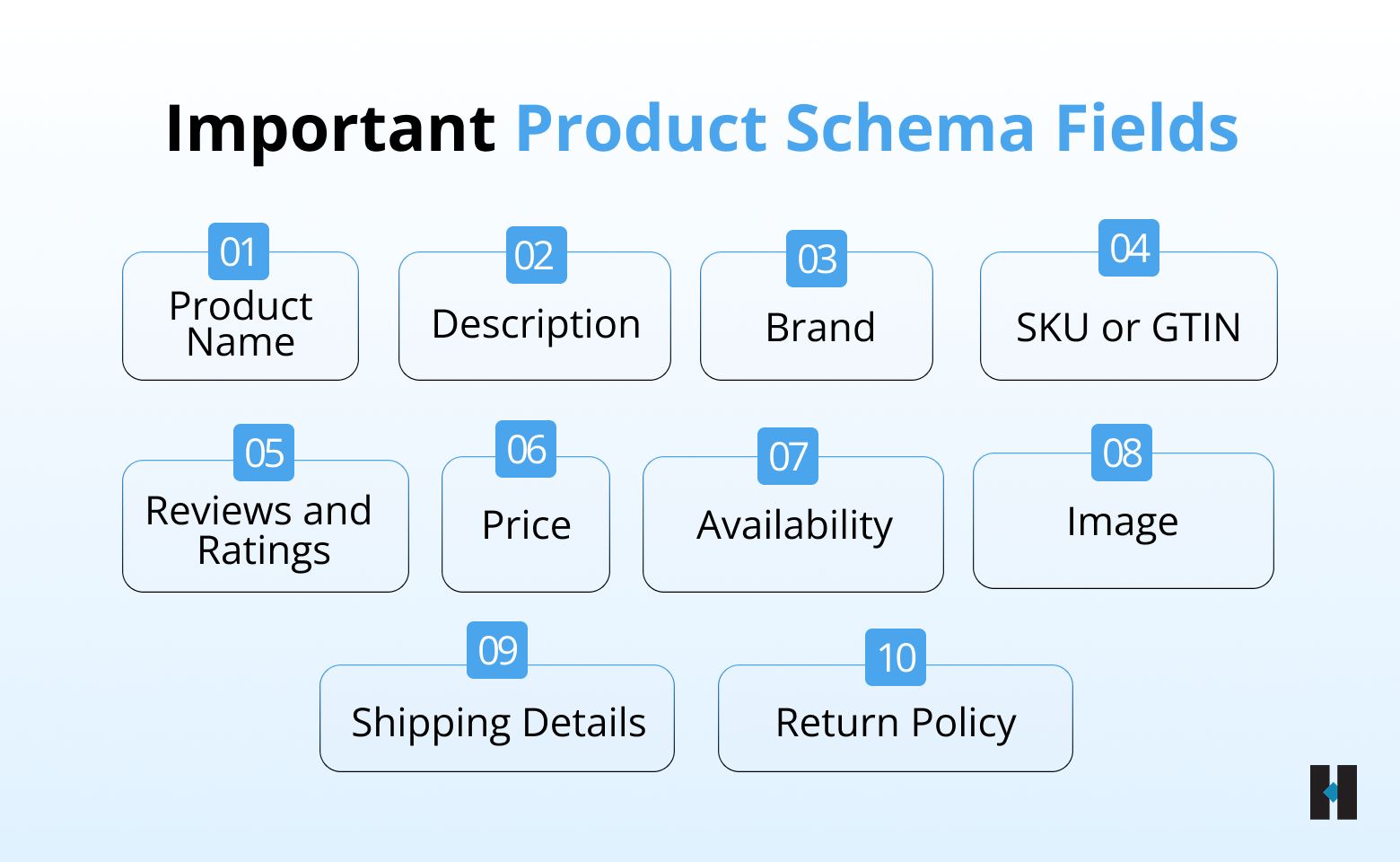
Structured data will not magically rank a weak page, but it helps Google understand your product more accurately.
13. Keep Your Merchant Center Feed Accurate
For Shopify stores, Google Merchant Center is important for both paid and free product visibility.
Your product feed should match your website. If your Shopify product page says one price and your Merchant Center feed says another, it can create errors and trust issues.
Keep these fields accurate:
- Product title
- Description
- Price
- Availability
- Product image
- Brand
- GTIN or product identifier
- Shipping details
- Return policy
- Product category
Google has also expanded ways for merchants to share shipping and returns information, including through Search Console and organization-level structured data.
Review your feed regularly, especially if you update prices, run sales, change variants, or frequently go in and out of stock.
14. Strengthen Internal Linking
Internal linking helps Google discover important pages and understand how your store is connected. It also helps shoppers move from information to purchase.
Good internal links feel natural. They guide the user to the next useful page.
Examples:
- Blog post to relevant collection
- Product page to buying guide
- Collection page to the related collection
- Homepage to best-selling categories
- FAQ page to product pages
- Product page for complementary products
Use descriptive anchor text. Instead of “click here,” write:
- “shop LED face masks”
- “compare at-home IPL devices”
- “view leather wallet collection”
- “read our size guide”
Every important page should have internal links pointing to it. If a page has no links from other pages, Google and users may treat it as less important.
15. Handle Filters, Tags, and Pagination Carefully
Shopify filters and tags are useful for shoppers, but they can create SEO problems if not controlled properly.
Common examples include:
- Sort URLs
- Filter URLs
- Tag pages
- Search result pages
- Parameter-based URLs
- Multiple versions of the same collection
Some filtered pages may deserve to be indexed. For example, “black maxi dresses” could be a useful page if users search for it and the page has enough products.
But pages like “size XS + sale + price low to high” usually do not need to be indexed.
Google’s pagination guidance explains that ecommerce sites may need to take steps to ensure Google can find all important content when using pagination or incremental loading.
The goal is simple: index pages with real search value and keep duplicate or low-value pages under control.
16. Improve Core Web Vitals
A slow Shopify store can hurt both rankings and conversions. Users do not want to wait for product images, variant selectors, review widgets, or checkout buttons to load.
Google’s Core Web Vitals measure real-world user experience across loading performance, interactivity, and visual stability. Google recommends achieving good Core Web Vitals for Search success and a better user experience.
Focus on:
- LCP: How fast does the main content load
- INP: how quickly the page responds to user interactions
- CLS: How stable is the layout while loading
INP replaced FID as a Core Web Vital in March 2024, so Shopify stores should now pay close attention to interaction delays caused by apps, scripts, popups, and heavy JavaScript.
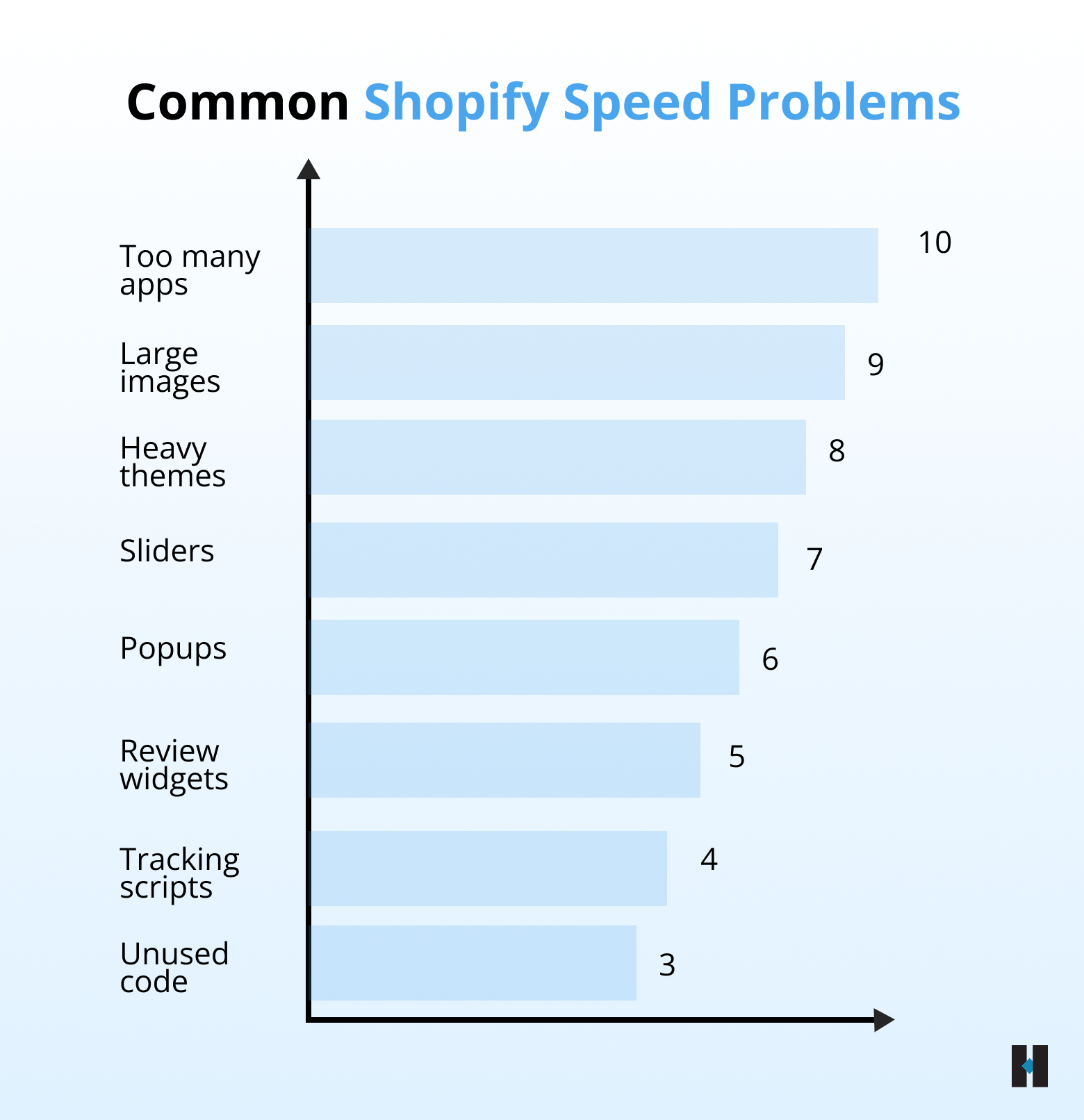
Start with your homepage, collection template, product template, and cart page.
17. Optimize the Mobile Shopping Experience
Mobile SEO is not only about responsive design. It is about whether a user can comfortably browse, compare, and buy from a phone.
Your mobile product page should make the buying journey easy.
Check:
- Is the product image visible above the fold?
- Is the price clear?
- Is the add-to-cart button easy to find?
- Are variants simple to select?
- Is the text readable?
- Are reviews easy to scan?
- Are shipping and return details visible?
- Are pop-ups blocking the page?
- Is checkout smooth?
Adobe’s holiday data shows how important mobile and AI-led shopping journeys have become, with online retail behavior increasingly shifting across mobile, AI referrals, and digital discovery paths.
For Shopify brands, mobile experience directly affects SEO performance, user engagement, and revenue.
18. Remove Duplicate, Thin, and Low-Value Pages
Over time, Shopify stores collect unnecessary pages. Old products, empty collections, duplicate tags, expired sale pages, and thin blog posts can make your site harder to understand.
Review your store and ask:
- Does this page serve a real purpose?
- Does it target a unique search intent?
- Does it have useful content?
- Is it internally linked?
- Does it get impressions or clicks?
- Does it help users buy or learn?
If the answer is no, decide whether to:
- Improve the page
- Merge it with another page
- Redirect it
- Noindex it
- Remove internal links
- Update the content
- Fix the canonical tag
A cleaner Shopify store is easier for Google to crawl and easier for shoppers to trust.
19. Build Helpful Blog Content Around Buyer Questions
A Shopify blog should support the buying journey. It should not be used only to publish random articles for traffic.
Good blog content answers real customer questions before they buy.
Examples:
- “How to choose the right LED face mask.”
- “IPL vs waxing: which is better for at-home hair removal?”
- “How to measure your space for a dining table.”
- “What fabric is best for summer shirts?”
- “How to care for leather bags.”
Each blog should naturally connect to relevant collections, products, guides, or FAQs.
Google’s guidance on AI features says the same SEO best practices apply to AI Overviews and AI Mode, which means useful, crawlable, well-structured content remains important for both traditional and AI-assisted search.
Write blogs that reflect your products, your customers’ questions, and your expertise. Do not create generic content that could appear on any ecommerce website.
20. Build Trust With Reviews, Policies, and Brand Signals
Trust is a major part of ecommerce SEO because users are not only deciding whether to click. They are deciding whether to spend money.
Your Shopify store should clearly show:
- Customer reviews
- Product ratings
- Return policy
- Shipping information
- Contact details
- Secure payment options
- Warranty or guarantee
- About the brand
- Real product photos
- FAQs
- Customer support options
Google’s product documentation highlights details such as price, availability, review ratings, shipping information, and returns as product information that can appear in richer search results.
Trust signals also improve conversion. If two stores sell similar products, the store with clearer policies, better reviews, stronger product content, and easier support usually wins.
Do not hide important information. Make customers feel safe before they reach checkout.
Turning This Shopify SEO Checklist Into Results
Shopify SEO in 2026 is not about making small keyword changes and waiting for rankings to improve. It is about building a store that Google can understand and that customers can trust.
At tecHindustan, we suggest treating Shopify SEO as a complete growth system. Technical SEO, product content, collection page optimization, structured data, site speed, internal linking, Merchant Center accuracy, and user experience should all work together.
The basics still matter: crawlable navigation, clean URLs, keyword mapping, unique titles, helpful product copy, optimized images, structured data, fast pages, and strong internal links. But the standard is higher now. Google is placing more value on pages that are useful, reliable, technically accessible, and created for people rather than only for search engines.
For Shopify brands, our recommendation is simple: do not treat SEO as a one-time setup. Review Search Console monthly, monitor indexing, update product data, improve weak collection and product pages, refresh outdated blog posts, fix broken links, and keep your Merchant Center feed accurate.
A Shopify store that combines strong technical SEO, clear product information, helpful content, fast performance, and real trust signals has a much better chance of ranking higher, getting more qualified clicks, and converting shoppers into customers.
Need help identifying what is limiting your store’s search visibility? Contact tecHindustan for a detailed Shopify SEO review and a practical strategy focused on rankings, traffic, and conversions.
FAQs
